AI models
CVAT’s AI features use AI models, which can be added via several methods, namely:
- Nuclio functions.
- Functions powered by third-party services (Hugging Face and Roboflow).
- Functions powered by CVAT AI agents (also known as native functions).
The following table shows the availability of each model deployment method across CVAT editions:
| Method | CVAT Community | CVAT Enterprise | CVAT Online |
|---|---|---|---|
| Nuclio functions | Yes | Yes | Certain functions only |
| Third-party functions | No | Yes | Yes |
| Native functions | No | Yes | Yes |
Each function has a certain kind, which determines the tools that can use it in the CVAT UI. The following kinds are defined:
| Kind | Used by |
|---|---|
| Detector | AI Tools (the “Detectors” tab), as well as automatic annotation |
| Interactor | AI Tools (the “Interactors” tab) |
| Reidentifier | Automatic annotation |
| Tracker | Depending on the shape types supported by the tracker, either AI Tools (the “Trackers” tab) or annotation actions |
Nuclio functions
A Nuclio function is a Docker container that runs on the same host or Kubernetes cluster as CVAT itself and processes inference requests that come from it. To add a Nuclio function to CVAT, a system administrator must build and deploy it. Consult the serverless tutorial for more information.
Once deployed, a Nuclio function is available to every user of the CVAT instance.
Nuclio functions can have any kind.
A Nuclio function can be built from custom source code and thus be internally implemented in any way that fits the interface expected by CVAT. However, the CVAT source repository also includes several predefined Nuclio functions in source code form, which can be used either directly or as examples for building custom functions. In addition, CVAT Enterprise customers gain access to additional predefined functions, including the SAM 2 Tracker. Consult Segment Anything 2 Tracker for more information.
Predefined Nuclio functions
The following predefined function implementations are available
in the serverless directory of the source repository.
Interactors
| Model | Description | Example |
|---|---|---|
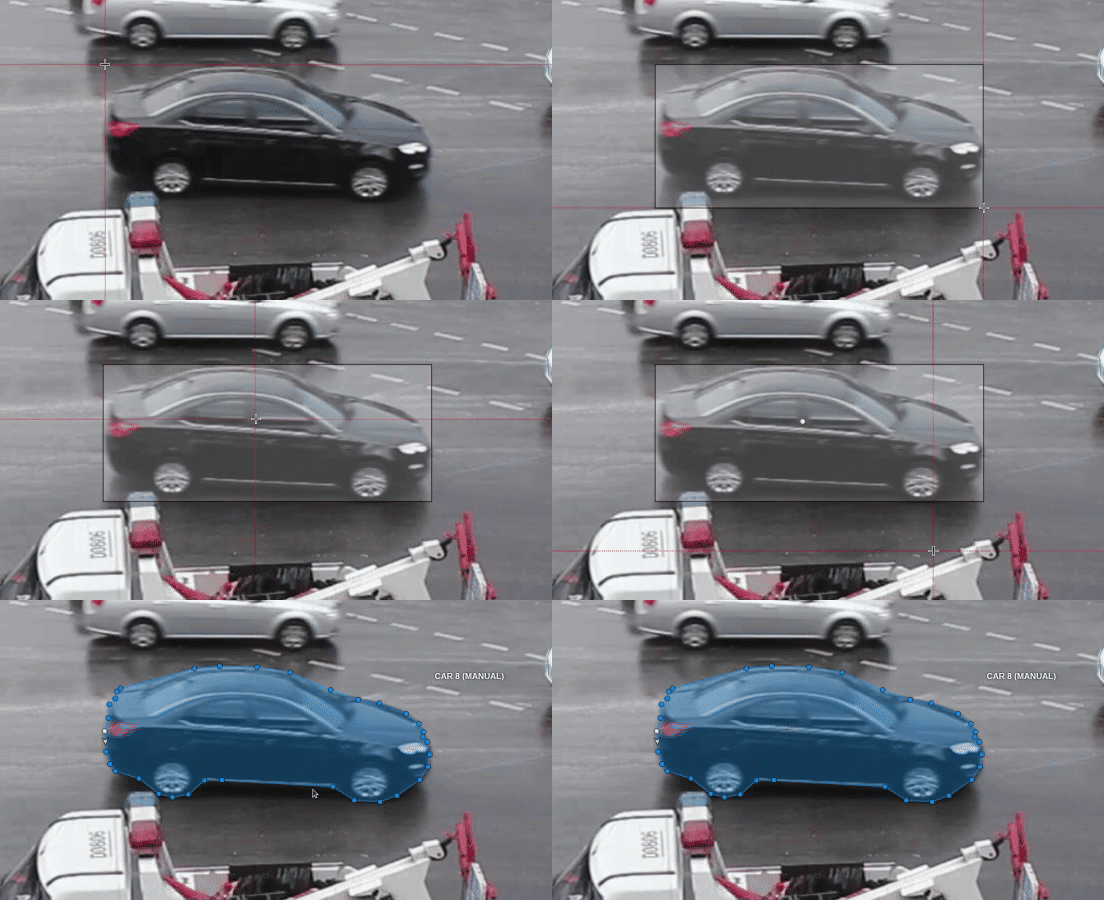
| Inside-Outside Guidance (IOG) |
The model uses a bounding box and inside/outside points to create a mask. First of all, you need to create a bounding box, wrapping the object. Then you need to use positive and negative points to say the model where is a foreground, and where is a background. Negative points are optional. For more information, see: |
 |
| Segment Anything Model (SAM) | The Segment Anything Model (SAM) produces high quality object masks, and it can be used to generate masks for all objects in an image. It has been trained on a dataset of 11 million images and 1.1 billion masks, and has strong zero-shot performance on a variety of segmentation tasks. For more information, see: |
 |
Detectors
| Model | Description |
|---|---|
| Face Detection | Face detector based on MobileNetV2 as a backbone for indoor and outdoor scenes shot by a front-facing camera. For more information, see: |
| Faster RCNN with Tensorflow | Faster RCNN version with Tensorflow. The model generates bounding boxes for each instance of an object in the image. In this model, RPN and Fast R-CNN are combined into a single network. For more information, see: |
| Mask RCNN | The model generates polygons for each instance of an object in the image. For more information, see: |
| RetinaNet | Pytorch implementation of RetinaNet object detection. For more information, see: |
| YOLO v7 | YOLOv7 is an advanced object detection model that outperforms other detectors in terms of both speed and accuracy. It can process frames at a rate ranging from 5 to 160 frames per second (FPS) and achieves the highest accuracy with 56.8% average precision (AP) among real-time object detectors running at 30 FPS or higher on the V100 graphics processing unit (GPU). For more information, see: |
Trackers
| Model | Description | Example |
|---|---|---|
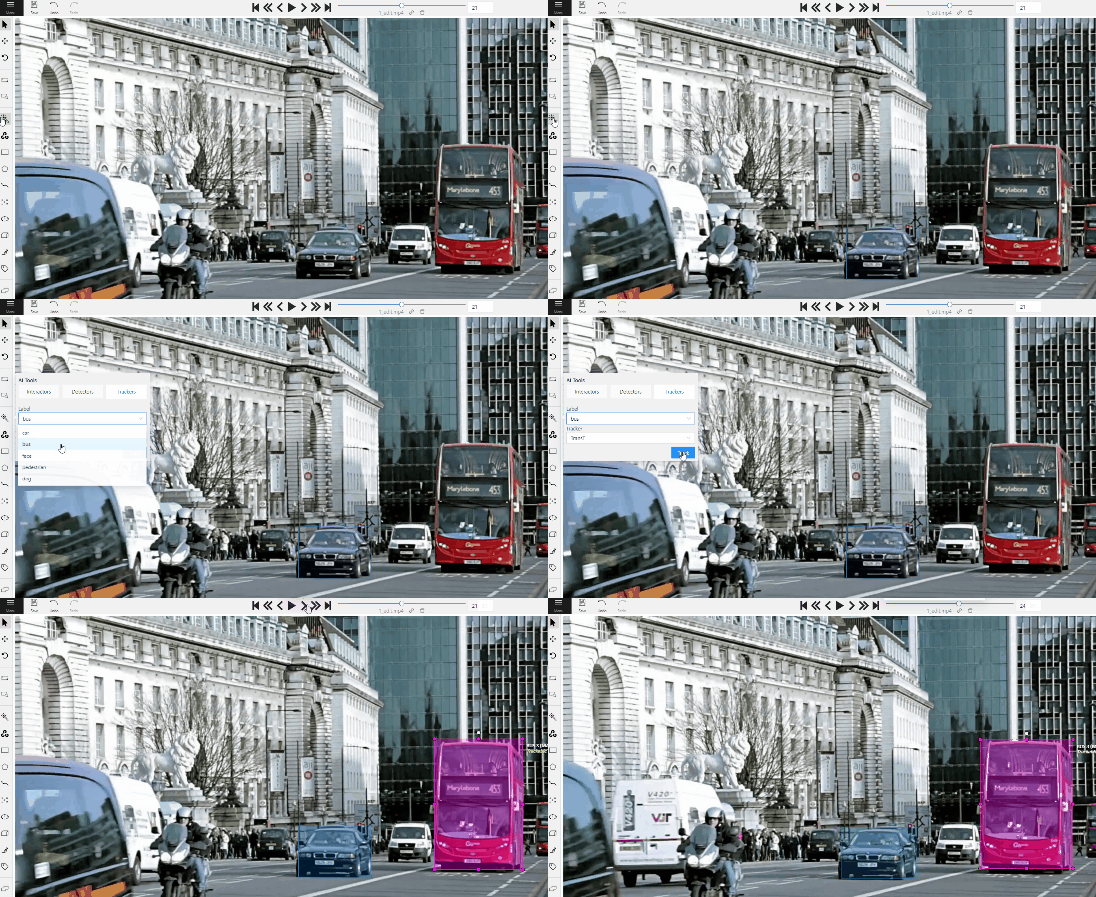
| Transformer Tracking (TransT) | Simple and efficient online tool for object tracking and segmentation. If the previous frame was the latest keyframe for the object, the trackable object will be tracked automatically. This is a modified version of the PyTracking Python framework based on Pytorch For more information, see: |
 |
Nuclio functions in CVAT Online
Since CVAT Online is administered by CVAT.ai Corporation, users may not add custom Nuclio functions to it. However, CVAT.ai makes several functions from the lists above available in CVAT Online. The exact set of available functions may vary over time at CVAT.ai’s discretion.
Third-party functions
Available in:CVAT OnlineCVAT EnterpriseA third-party function is a resource stored in CVAT that comprises a URL to a model in a third-party inference service and a credential used to access that service. This third-party service is called when the function is used as a model in the CVAT UI.
The following services are currently supported:
-
To be usable from CVAT, a model hosted in Hugging Face must support the Inference API, which can be verified by checking that the “Inference Providers” gadget on the model page lists “HF Inference API” as one of the providers. Additionally, the model’s task must be “Image Classification”, “Image Segmentation”, or “Object Detection”.
-
To be usable from CVAT, a model hosted in Roboflow must have task type “Classification”, “Instance Segmentation”, “Object Detection”, or “Semantic Segmentation”.
A third-party function can be created via the CVAT UI on the Models page.
Any user may create a third-party function to their personal workspace, in which case it will only be usable by them.
Alternatively, an organization maintainer may create a third-party function within the organization. In this case, the function will be usable by all other members of the organization.
Third-party functions always have kind “detector”.
For a walkthrough of this feature, see Streamline annotation by integrating Hugging Face and Roboflow models.
This video demonstrates the process:
Native functions
Available in:CVAT OnlineCVAT EnterpriseYou can connect your own model to CVAT using cvat-cli.
The model runs on your machine as an AI agent: it receives requests from CVAT and sends back annotations.
CVAT stores the model’s name, labels, and capabilities as a native function.
Agents support three kinds of functions:
- Detectors run automatically and produce boxes, masks, tags, or poses, depending on the model.
- Interactors use your prompts, such as points and bounding boxes, to annotate objects in AI assistance → Prompting.
- Trackers follow objects across frames, through Tracking or annotation actions depending on their shape types.
The setup has three steps:
- Prepare a Python function for your model, or choose a ready-to-use function below.
- Choose a deployment scope and register the model with
cvat-cli function create-native. - Start the agent with
cvat-cli function run-agentand keep it running while using the model in CVAT.
Set up CVAT CLI
Run these commands on the machine that will run the model. The examples use a Linux/macOS shell and require Git and a Python version supported by the model’s dependencies.
python3 -m venv .venv
source .venv/bin/activate
python -m pip install --upgrade pip cvat-cli
Create a Personal Access Token in CVAT, then configure your connection:
export CVAT_SERVER_URL="https://app.cvat.ai"
export CVAT_ACCESS_TOKEN="replace-with-your-token"
For Enterprise, use your instance URL instead of https://app.cvat.ai.
Choose a deployment scope
Choose one of these settings before running the examples.
Only you can use the model.
export CVAT_ORG=""
Organization members can use the model.
export CVAT_ORG="your-organization-slug"
Note
- Use the organization's slug, not its display name.
- Registering an organization model requires the owner or maintainer role.
CVAT Enterprise only. All users of the instance can use the model.
Use an instance administrator’s token and set:
export CVAT_ORG=""
Add --visibility=public to the create-native command in your chosen example.
The run-agent command does not need this option.
Ready-to-use models
The cvat-ai/cvat-models repository provides Python functions for supported models. You can use them directly without writing a wrapper:
| Example | What it does | Where to use it |
|---|---|---|
| YOLO | Detection, segmentation, or pose estimation | AI assistance → Auto-labeling |
| Hugging Face Transformers | Detection, segmentation, or classification | AI assistance → Auto-labeling |
| SAM2 tracking | Tracks an existing mask or polygon | Run annotation action |
| SAM2 interactor | Segments objects from points and boxes | AI assistance → Prompting |
Clone the repository and run the examples from its directory:
git clone https://github.com/cvat-ai/cvat-models.git
cd cvat-models
Choose an example below. After registration, replace <function_id> (including the angle brackets)
with the numeric ID shown in the command output.
For example, if the output says Created function #8, use 8.
Use the same model parameters and workspace when registering and starting the agent.
The examples use the CPU; for a GPU, install compatible CUDA-enabled PyTorch dependencies and change
-p device=str:cpu to -p device=str:cuda in both commands.
-
Install dependencies:
python -m pip install --upgrade -r detector/yolo/requirements.txt -
Register the model:
cvat-cli --server-host "$CVAT_SERVER_URL" --org "$CVAT_ORG" function create-native "YOLO" \ --function-file detector/yolo/func.py \ -p model=str:yolo26n.pt -p device=str:cpu -
Start the agent:
cvat-cli --server-host "$CVAT_SERVER_URL" --org "$CVAT_ORG" function run-agent <function_id> \
  --function-file detector/yolo/func.py \
  -p model=str:yolo26n.pt -p device=str:cpu
In a CVAT job, select AI assistance → Auto-labeling → Model → YOLO, map the model labels to task labels, and run it. You can also use the model for task automatic annotation.
The table shows example weights, not a complete list of supported models.
You can use other compatible numbered YOLO models, including newer versions supported by your installed
Ultralytics library and the CVAT YOLO function. These examples use
YOLO26.
See the Ultralytics model catalog for available weights and model capabilities.
YOLO-World and YOLOE are not supported by this CVAT function.
Use the same model value when registering the function and starting the agent.
| Purpose | Example model value |
|---|---|
| Detection | str:yolo26n.pt |
| Instance segmentation | str:yolo26n-seg.pt |
| Human pose estimation | str:yolo26n-pose.pt |
| Custom weights | str:/absolute/path/to/best.pt |
Pretrained weights are downloaded automatically. Pose models need a matching skeleton label in CVAT. For custom pose keypoint names and supported models, see the YOLO README, which also links to the Ultralytics licensing terms.
This example runs a DETR detector on your machine using the Transformers library.
-
Install dependencies:
python -m pip install -r detector/transformers/requirements.txt -
Register the model:
cvat-cli --server-host "$CVAT_SERVER_URL" --org "$CVAT_ORG" function create-native "DETR" \ --function-file detector/transformers/func.py \ -p task=str:object-detection -p model=str:facebook/detr-resnet-50 -p device=str:cpu -
Start the agent:
cvat-cli --server-host "$CVAT_SERVER_URL" --org "$CVAT_ORG" function run-agent <function_id> \
  --function-file detector/transformers/func.py \
  -p task=str:object-detection -p model=str:facebook/detr-resnet-50 -p device=str:cpu
Select AI assistance → Auto-labeling → Model → DETR, map the labels, and run it.
For segmentation or classification, use the corresponding task and model values below in both commands.
Register each model as a separate function with a descriptive name.
| Purpose | task value |
Example model value |
Output |
|---|---|---|---|
| Object detection | str:object-detection |
str:facebook/detr-resnet-50 |
Boxes |
| Panoptic segmentation | str:image-segmentation |
str:facebook/detr-resnet-50-panoptic |
Masks |
| Semantic segmentation | str:image-segmentation |
str:nvidia/segformer-b0-finetuned-ade-512-512 |
Masks |
| Image classification | str:image-classification |
str:google/vit-base-patch16-224 |
Tags |
Where to find more models
- Check the CVAT agent’s expected-compatible model architectures. This lists architecture classes, not model IDs; it is not a guarantee that every checkpoint will work.
- Browse Hugging Face models filtered by object detection, image segmentation, or image classification. Choose a model supported by the corresponding Transformers pipeline and check its model card for dependencies.
The model ID is the owner/model-name shown on its Hugging Face page.
See the Transformers function README
for supported parameters. These agents run locally; a hosted Hugging Face inference provider is not required.
Use points and bounding boxes to segment an object in the current frame.
-
Install dependencies:
python -m pip install -r interactor/sam2/requirements.txt -
Register the interactor:
cvat-cli --server-host "$CVAT_SERVER_URL" --org "$CVAT_ORG" function create-native "SAM2 interactor" \ --function-file interactor/sam2/func.py \ -p model_id=str:facebook/sam2.1-hiera-tiny -p device=str:cpu -
Start the agent:
cvat-cli --server-host "$CVAT_SERVER_URL" --org "$CVAT_ORG" function run-agent <function_id> \
  --function-file interactor/sam2/func.py \
  -p model_id=str:facebook/sam2.1-hiera-tiny -p device=str:cpu
In a job, open AI assistance → Prompting, select SAM2 interactor and the annotation label, then click Add visual prompts. Add points or a bounding box around the object, refine the mask with positive and negative points, and finish the interaction to create the annotation.
In older CVAT versions, use AI Tools → Interactors → Interact. See the SAM2 interactor README for model options.
-
Install dependencies:
python -m pip install -r tracker/sam2/requirements.txt -
Register the tracker:
cvat-cli --server-host "$CVAT_SERVER_URL" --org "$CVAT_ORG" function create-native "SAM2 Tracker" \ --function-file tracker/sam2/func.py \ -p model_id=str:facebook/sam2.1-hiera-tiny -p device=str:cpu -
Start the agent:
cvat-cli --server-host "$CVAT_SERVER_URL" --org "$CVAT_ORG" function run-agent <function_id> \
  --function-file tracker/sam2/func.py \
  -p model_id=str:facebook/sam2.1-hiera-tiny -p device=str:cpu
In a video job, draw a mask or polygon, open its menu, and choose Run annotation action → AI Tracker: SAM2. Set the target frame, click Run, and review the results. A GPU is recommended for practical tracking.
SAM2 tracks masks and polygons through annotation actions, not the sidebar’s rectangle-based Tracking selector. See SAM2 tracking for the full workflow and required enhanced actions plugin.
After setup
Keep the agent terminal open while using the model. Ctrl+C stops the agent but leaves the model registered;
run the same run-agent command to restart it. To remove the model after stopping the agent:
cvat-cli --server-host "$CVAT_SERVER_URL" --org "$CVAT_ORG" function delete <function_id>
If the model is missing, check the selected server and workspace. If requests wait without results, check the agent’s terminal and function ID. In older CVAT versions, AI assistance → Auto-labeling is named AI Tools → Detectors.
Use another model
For a model without a ready-to-use function, implement the CVAT SDK function interface. Start with the Python detection function example, which shows how to load a model, define its labels, and return predictions in CVAT format. For prompt-based models or trackers, see the interaction protocol or tracking protocol.
The CLI function-loading examples
explain how to expose a function through a Python file or a create factory and pass parameters with -p.
Then use the same registration and agent commands with your Python file and its parameters.
Native functions can be detectors, interactors, or trackers.
For container deployment, see the Docker Compose guide or Helm guide.